Billing
OpsPilot uses a unified billing model that covers both on-premise and cloud usage in one place.
If you’re already running the FusionReactor agent on-premise, you can enable OpsPilot cloud features with a single click - no migration, no reconfiguration, and no change to your existing FusionReactor pricing. The FusionReactor agent costs the same whether it runs purely on-premise or connected to OpsPilot.
To get started, sign up for a free, no-obligation trial. All plan and subscription management is handled within the app.
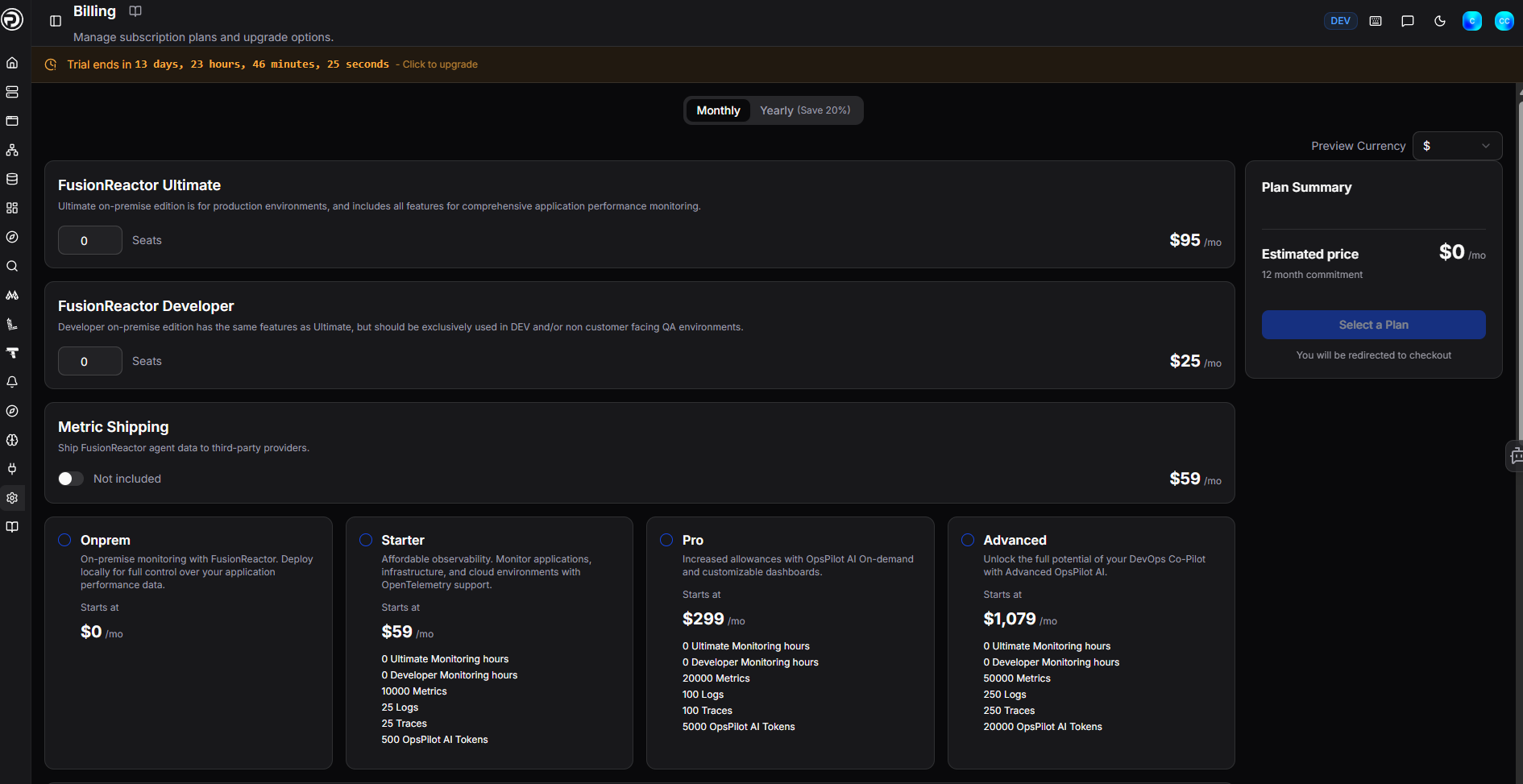
Purchasing a Subscription
- Log in to the OpsPilot Portal.
- Navigate to Administration > Billing in the left-hand menu.
-
At the top of the page, select Monthly or Yearly billing.
Note
The Yearly option saves approximately 20%.
- If you are running the FusionReactor agent on-premise, set the number of FusionReactor Ultimate and/or FusionReactor Developer seats required.
- Optionally enable Metric Shipping to ship FusionReactor agent data to third-party providers ($59/mo).
- Select your OpsPilot plan: Onprem, Starter, Pro, or Advanced.
- Review the Plan Summary on the right and click Select a Plan to proceed to checkout.
What's included
| Plan | Price | Metrics | Logs | Traces | OpsPilot tokens |
|---|---|---|---|---|---|
| Trial | FREE | Unlimited | Unlimited | Unlimited | 1,000 |
| Onprem | $0/mo | - | - | - | - |
| Starter | $49 (A) $59 (M) |
10,000 | 25 | 25 | 500 |
| Pro | $249 (A) $299 (M) |
20,000 | 100 | 100 | 5,000 |
| Advanced | $899 (A) $1,079 (M) |
50,000 | 250 | 250 | 20,000 |
| FusionReactor Ultimate | $79 (A) $95 (M) /seat |
5,000 | 2 GB | 2 GB | - |
| FusionReactor Developer | $25/mo /seat | - | - | - | - |
| Metric Shipping | $59/mo | - | - | - | - |
| Historical data retention | 13 months | 30 days | 30 days | - |
Info
Custom dashboards are available on all plans at no additional cost.
Note
Additional on-demand usage outside of the plan is chargeable.
Plans
Onprem
The Onprem plan is for teams running the FusionReactor agent in their own infrastructure. It has no base cost - you pay only for the on-premise seats you need.
| Price | |
|---|---|
| FusionReactor Ultimate | $79 (A) / $95 (M) per seat |
| FusionReactor Developer | $25/mo per seat |
The total cost depends on the number of Ultimate and Developer seats selected. Optionally add Metric Shipping ($59/mo) to ship agent data to third-party providers.
Warning
The Developer edition is not licensed for production use.
Learn more
Starter
The Starter plan is recommended for observability, distributed tracing, infrastructure monitoring, and log management. It has a base cost of $49/mo (annual) or $59/mo (monthly), which includes:
| Metrics | Logs | Traces | OpsPilot tokens |
|---|---|---|---|
| 10,000 | 25 GB | 25 GB | 500 |
Learn more
Pro
The Pro plan provides increased allowances and OpsPilot AI on-demand with customisable dashboards. It has a base cost of $249/mo (annual) or $299/mo (monthly), which includes:
| Metrics | Logs | Traces | OpsPilot tokens |
|---|---|---|---|
| 20,000 | 100 GB | 100 GB | 5,000 |
Learn more
Advanced
The Advanced plan unlocks the full potential of OpsPilot as a DevOps co-pilot with advanced AI capabilities. It has a base cost of $899/mo (annual) or $1,079/mo (monthly), which includes:
| Metrics | Logs | Traces | OpsPilot tokens |
|---|---|---|---|
| 50,000 | 250 GB | 250 GB | 20,000 |
Learn more
Custom pricing
Need a large number of seats or a tailored plan? Contact our Sales Team for custom pricing.
OpsPilot AI
OpsPilot AI is an advanced observability solution that leverages generative AI to provide powerful insights into the performance of your applications. Using OpsPilot AI tokens enables you to identify and resolve issues before they occur, optimize the performance of your applications, and reduce downtime.
Learn more
Warning
As the OpsPilot AI uses previous prompts and responses to reply to a query, long involved responses can prove costly.
FusionReactor Ultimate Reservations
Customers running the FusionReactor agent can optionally reserve FusionReactor Ultimate seats to manage costs and avoid on-demand billing. Seats are priced at $79/mo (annual) or $95/mo (monthly).
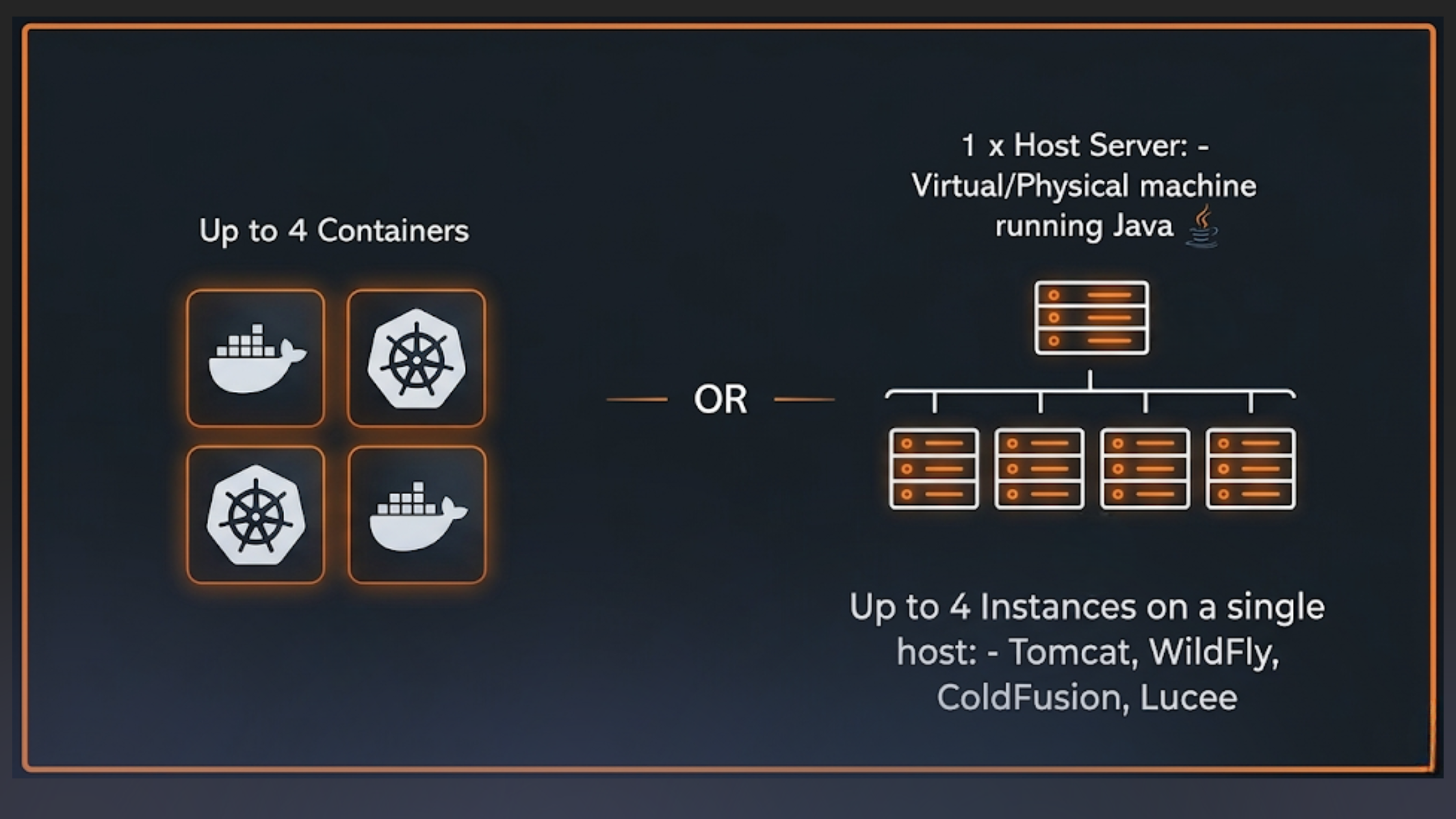
A seat covers a single unique virtual or physical host with up to 4 instances of Java/ColdFusion installed, or up to 4 Docker containers.
Example
5–8 instances on a host requires 2 seats.
Note
It is possible to be billed fully on-demand with no seat reservation required.
Learn more
On-demand
FusionReactor Agent is also billable fully on-demand. In these cases it will not include the logs, metrics and traces usage which will be billed in addition to the hourly cost of using an agent.
Note
Customers will always have to purchase the Starter plan, which includes the set number of metrics, logs, traces, OpsPilot tokens and snapshots.
On-demand usage costs
OpsPilot, logs, metrics, and traces are all available at on-demand rates for those who go over the included allowance in the base cost and OpsPilot Ultimate.
FusionReactor agent instances will continue to be billed at $0.13 per hour, but their metrics, logs and traces will be charged additionally.
On-demand data will be charged at:
| FR instance | Metrics | Logs | Traces | OpsPilot tokens | Snapshots/Profiles |
|---|---|---|---|---|---|
| $0.13 /hour | $10 /1K | $0.5 /1 GB | $0.5 /1 GB | $20 for 250 | $0.5 /1 GB |
Usage calculations
Both annual and monthly plan usage is calculated and billed each month.
| Data type | Description |
|---|---|
| FR hours | Calculated by performing a sum of all values over the billing period. |
| Metrics | Calculated by performing a mean average for the billing period |
| Logs | Calculated by performing a sum of all values over the billing period. |
| Traces | Calculated by performing a sum of all values over the billing period. |
| OpsPilot tokens | Calculated by performing a sum of all values over the billing period. |
Usage dashboards
To help keep things simple and transparent, OpsPilot has developed usage dashboards that allow you to visually track your billing data. You can also create alerts to fire if you exceed the allowed usage. These dashboards are located in Billing Dashboards where you can access Data Usage to calculate your approximate usage and the Billing Usage dashboard for a breakdown of your bill.
Data usage
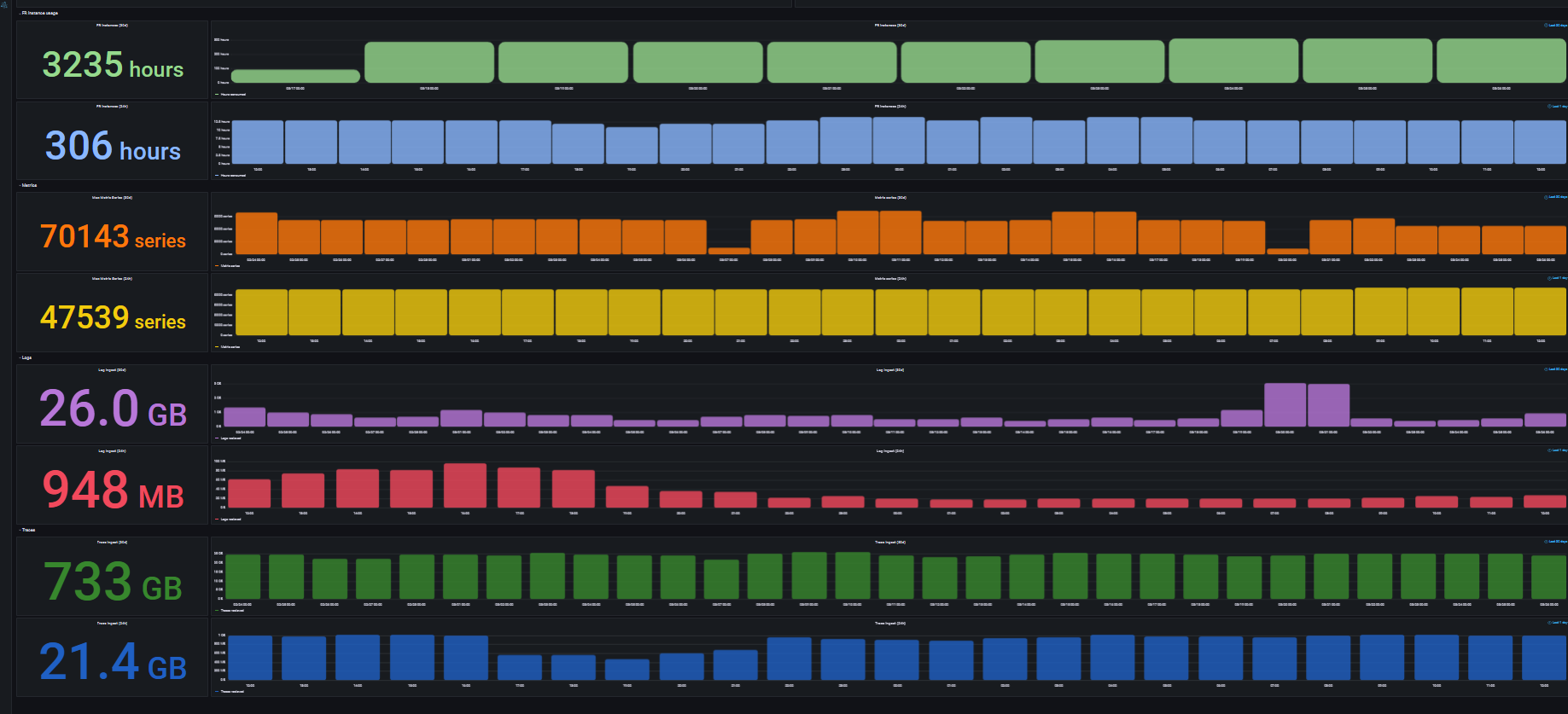
The data usage dashboard calculates the approximate usage of the FusionReactor instance, metrics, logs and traces. It displays the raw values or unedited data you have sent to OpsPilot.
FusionReactor agent instance
The first total in the graph relates to the FusionReactor agent instances and provides the number of hours the instance has been used.
For example, in the above graphic, the total number of hours in the FusionReactor instance is 3235 hours over 30 days which equates to running 5 seats. The figure of 306 hours shows the hours spent in the instance for the last 24 hours.
Metrics
In the Metrics section of the dashboard you can view the maximum number of metric series over the 30 day period.
For example, the above graphic indicates that 70143 series of metrics have been received over the 30 day period. The figure below of 47539 series shows the number of metrics received in the last 24 hours.
Note
For billing purposes, your account will never be at zero. We will add some metrics to your account in order to measure account usage.
Logs
In the Logs section of the dashboard you can view the total number of logs that have been ingested over the 30 day period.
For example, the above graphic indicates that 26 GB of logs have been ingested over the 30 day period. The figure below of 948MB shows the number of logs ingested in the last 24 hours.
Traces
In the Traces section of the dashboard you can view the total number of traces that have been ingested over the 30 day period.
For example, the above graphic indicates that 733 GB of traces have been ingested over the 30 day period. The figure below that of 21.4GB shows the number of traces ingested in the last 24 hours.
Data usage metrics
These are the current metrics OpsPilot supports for billing.
fr_usage_minutes: The amount of time used by running FR instances (per minute).
fr_logs_bytes_received: The amount of logs ingested into your account (per hour).
fr_traces_bytes_received: The amount of traces ingested into your account (per hour).
fr_metrics_series_count: The number of metric series ingested into your account (per hour).
Billing usage
At OpsPilot we have created the Billing usage dashboard to ensure cost transparency. This dashboard displays a breakdown of your billing usage into clearly defined sections to help you keep on top of your spending.
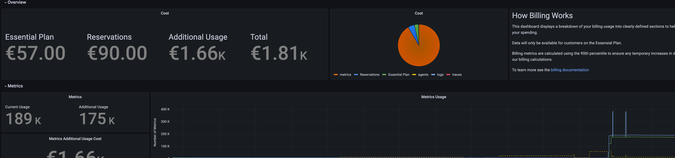
The dashboard provides the following:
-
Plan cost
-
Seat cost
-
Additional Usage cost
-
Total cost
To the right of the costs overview is a pie chart which visually displays your costs according to:
-
Plan
-
Seats
-
Agents
-
Metrics
-
Logs
-
Traces
The dashboard also provides detailed breakdowns for metrics, logs, traces and the FR agent of the following:
-
Current Usage
-
Additional Usage
-
Additional Charge Cost
Alongside each data source is a graph that provides further information on your usage as three different categories: Additional (green), Included (yellow), and Billed Total (blue). Any usage above the yellow line on the graph will be billed at on-demand rates.
Create an alert
To control your usage and spending costs it is possible to create an alert to fire if you exceed the allowed usage.
Learn more
Example billing usage checks
For instructions on configuring billing alerts, see the Billing checks section. The following data usage metrics are available for alerting:
fr_logs_bytes_receivedfr_traces_bytes_receivedfr_metrics_series_countfr_usage_minutes
Modifications
It is important to note that any upgrades you make to your billing plan occur immediately while downgrades will only come into effect at the end of the billing period.
Need more help?
Contact support in the chat bubble and let us know how we can assist.