Get Started with OpsPilot
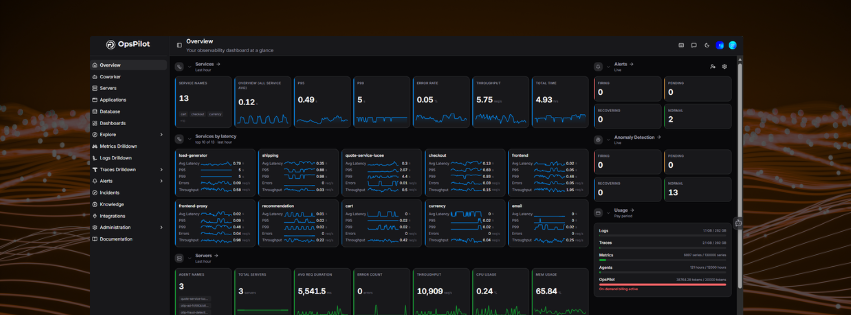
OpsPilot, formerly FusionReactor Cloud, is an AI-powered observability and SRE platform. This guide walks you through creating your account, connecting your first data source, and exploring your initial views - from sign-up to your first insights in minutes.
Already have an account?
Sign in and head to your dashboard to start exploring your data. If you have an invitation, follow the link in your invitation email to access your organization.
Step 1 - Create your account
Navigate to app.opspilot.com/auth/register and sign up. You're then guided through a short setup:
- Name your organization.
- Invite colleagues (optional) - add their email addresses to bring your team in, or skip for now.
- OpsPilot sets up your account. While you wait, use the See the instrumentation guide link to get a head start on instrumenting your application.
What you'll see first
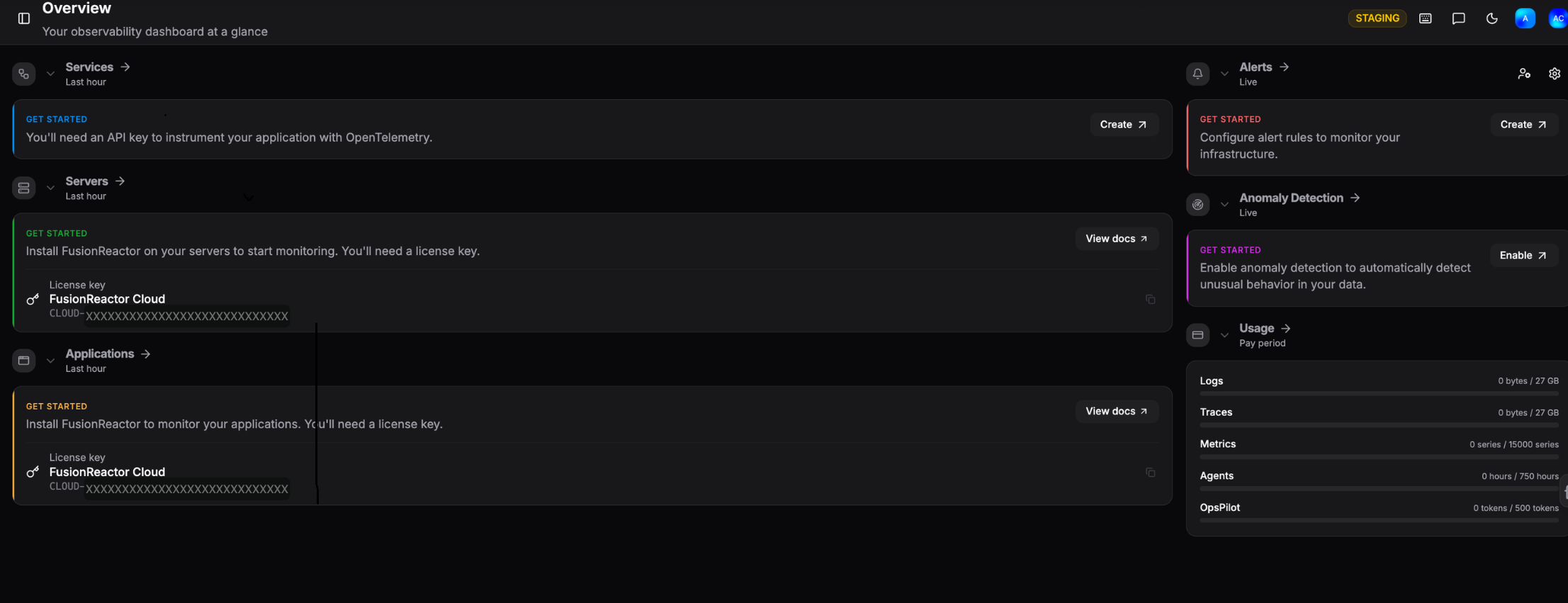
When setup finishes, you land on the Overview - your observability dashboard. With no data connected yet, each section shows a Get Started prompt telling you exactly what to install or configure:
- Coworker - set up your AI SRE teammate to investigate alerts and track ongoing situations across the services you care about.
- Servers and Applications - install the FusionReactor agent to start monitoring. Your license key is shown here, ready to copy.
- Services - instrument with OpenTelemetry using an API key.
- Alerts and Anomaly Detection - create alert rules or enable anomaly detection once data is flowing.
Step 2 - Instrument your application
Send telemetry from your applications using OpenTelemetry or the FusionReactor agent.
You'll need an API key
OpenTelemetry data is authenticated with an OpsPilot API key. Create one from the API Keys page - or click Create on the Services card on your Overview - then add it to your exporter configuration.
Select your language:
Or deploy an OpenTelemetry Collector to receive and forward telemetry from your services.
Step 3 - Connect your infrastructure
Get metrics, logs, and traces flowing from your infrastructure using Grafana Alloy or standalone OpenTelemetry exporters.
| Signal | How to ship it |
|---|---|
| Metrics | Run an OTel-compatible exporter (e.g. Node Exporter, cAdvisor) and forward via Grafana Alloy or the OTel Collector |
| Logs | Use the Alloy loki.source component or the OTel filelog receiver to tail and forward log files |
| Traces | Configure your collector or Alloy pipeline to receive and forward spans to OpsPilot |
Grafana Alloy is a flexible, vendor-neutral collector that can scrape, transform, and forward all three signal types in a single agent.
Integration Hub - coming soon
A full self-serve Integration Hub with one-click setup for cloud providers, databases, Kubernetes, and more is on the way. Watch this space.
Step 4 - Get answers with AI
Once data is flowing, OpsPilot's AI works in two ways:
- Coworker - your AI SRE teammate that runs automated investigations in the background, surfaces prioritised insights, and flags issues before they escalate. Learn more
- OpsPilot Chat - ask questions in plain English to query your telemetry, investigate specific issues, or get on-demand AI analysis across metrics, logs, and traces.
Step 5 - Explore your data
Dive deeper into your data using the built-in drilldown tools.
| Where to look | What you'll find | Required integration |
|---|---|---|
| UI Overview | A tour of the OpsPilot interface | Any |
| Servers | Live and historic server health | FusionReactor agent |
| Applications | Request rates, errors, and latency | FusionReactor agent |
| Dashboards | Pre-built and custom visualizations | Any |
| Metrics Drilldown | Explore Prometheus metrics without PromQL | OpenTelemetry / Prometheus |
| Logs Drilldown | Filter and analyze logs without LogQL | OpenTelemetry / Loki |
| Traces Drilldown | Trace requests across services | OpenTelemetry |
| Alerts | Set up rules and get notified | Any |
Need more help?
Contact support in the chat bubble and let us know how we can assist.