API Keys
The API Keys page lets you manage access credentials used by services and agents to communicate with OpsPilot.

Viewing & managing keys
Each listed API key displays:
| Field | Description |
|---|---|
| Name | A user-defined label for the key |
| Description | A short explanation of the key's purpose |
| Status toggle | Temporarily enable or disable the key |
| Copy icon | Copies the key value to your clipboard |
| Actions (...) | Edit the key's name or description, or permanently remove it |
Note
Deleting a key immediately revokes access for anything using it.
Creating a new key
Click + Create API Key to open the create form:
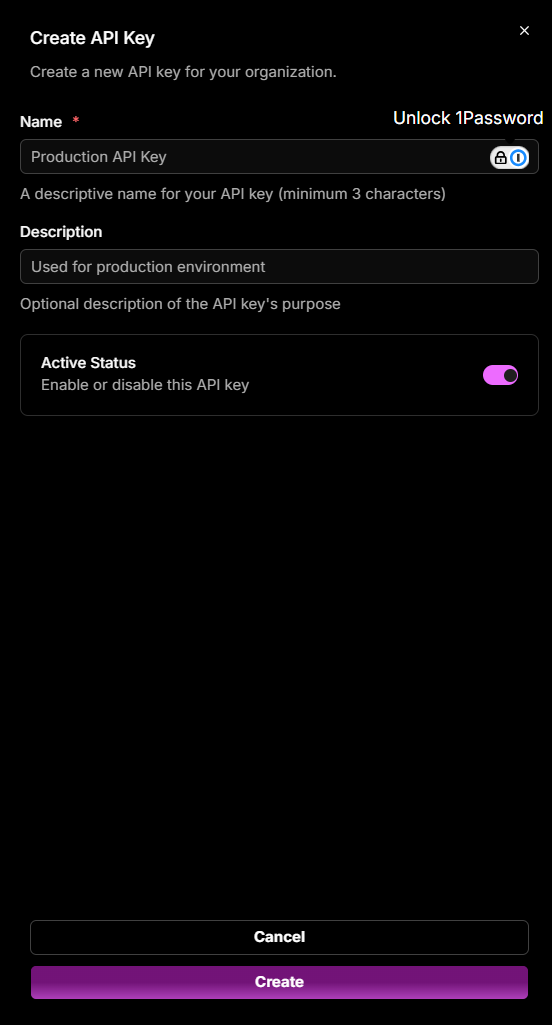
- Enter a Name (required, minimum 3 characters).
- Enter a Description (optional).
- Leave Active Status enabled to activate the key immediately, or toggle it off to create it disabled.
- Click Create.
Copy the key immediately after creation - it will not be shown again in full.
Need more help?
Contact support in the chat bubble and let us know how we can assist.