Preferences
The Preferences tab controls what reaches your personal feed. It has two cards: Feed relevance and Re-run onboarding.
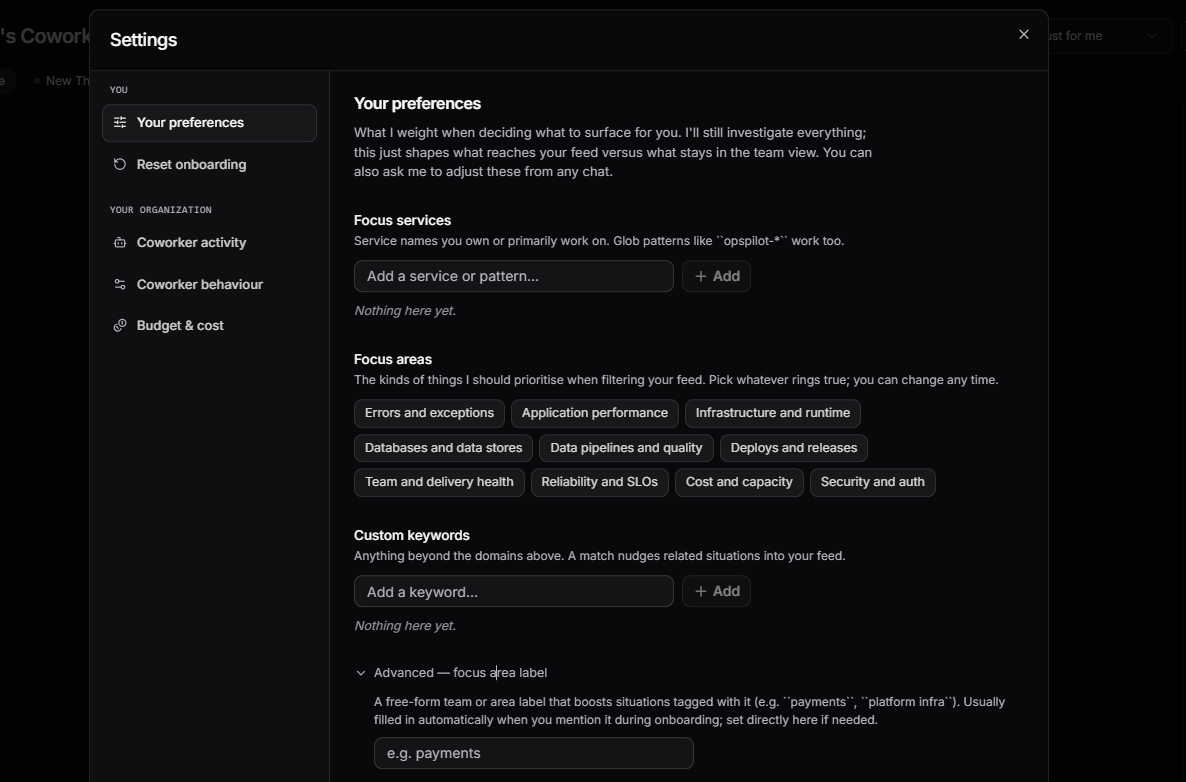
Feed relevance
Feed relevance shapes what reaches your personal feed. You can also ask Coworker to adjust these from any chat.
Feed filtering only
Coworker still investigates everything across your organisation - Feed relevance only controls what surfaces for you versus what stays in the team view.
| Setting | Description |
|---|---|
| Your role | Pick as many roles as fit: Developer, SRE / DevOps, Tech lead, or Manager / leadership. If every role you pick is a leadership one, Coworker keeps low-level observations out of your feed and surfaces only the things worth escalating |
| Focus services | Service names you own or primarily work on. Glob patterns like opspilot-* work too. Situations affecting these services are prioritised in your feed |
| Muted services | Situations on these services stay out of your feed, DMs, and notifications. Muting wins over everything else, including a service you also focus on. Glob patterns like legacy-* work too |
| Focus areas | The kinds of things Coworker should prioritise when filtering your feed: Errors and exceptions, Application performance, Infrastructure and runtime, Databases and data stores, Data pipelines and quality, Deploys and releases, Team and delivery health, Reliability and SLOs, Cost and capacity, Security and auth |
| Custom keywords | Anything beyond the domains above. A match nudges related situations into your feed |
| Advanced - focus area label | A free-form team or area label that boosts situations tagged with it (e.g. payments, platform infra). Usually filled in automatically when you mention it during onboarding; set directly here if needed |
Re-run onboarding
Click Open onboarding to walk through the getting-started flow again. Useful for adding more scheduled tasks, picking up extra alerts, or having another chat to refine your preferences. Re-running does not delete anything you already have - your tasks, situations, alert subscriptions, and preferences stay in place. You can opt into more from the takeover, or skip straight to the chat.
Need more help?
Contact support in the chat bubble and let us know how we can assist.