Budget & cost
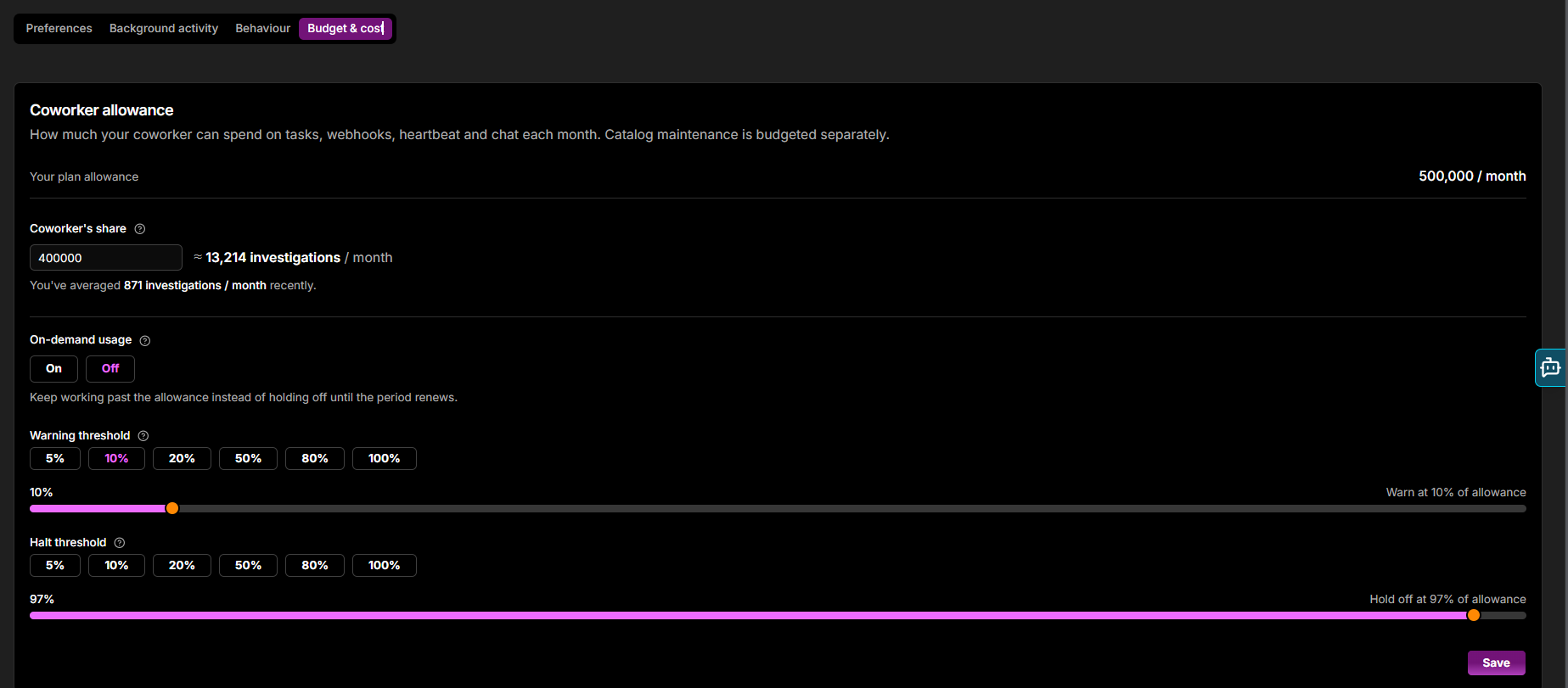
The Budget & cost tab is a single Coworker spend card that controls how much Coworker can spend each month and what happens as it approaches the limit. It covers tasks, webhooks, heartbeat, and chat; catalog maintenance is budgeted separately.
| Control | Description |
|---|---|
| Your plan allowance | Your organisation's total monthly AI Token allowance (read-only) |
| On-demand usage | On / Off, off by default. Off makes your plan allowance a hard ceiling - Coworker pauses new work until the period renews, and nothing bills as on-demand. On lets Coworker keep working past the plan allowance, up to your monthly spend cap |
| Monthly spend cap | The most Coworker may spend each month, in tokens. The panel shows the approximate number of investigations that buys per month, alongside your recent monthly average for comparison. Pick a preset (50%, 80%, or Plan) or drag the slider; set it to Plan and Coworker stops exactly at your plan allowance |
| Warning threshold | Sends a notification when spend reaches this percentage of the cap. Pick a preset (5% - 100%) or drag the slider |
On-demand usage can exceed your allowance
With On-demand usage on, Coworker can spend past your plan allowance, up to your Monthly spend cap. Set the cap to bound the extra cost.
Click Save to apply your changes. See AI Tokens for full usage details and optimisation suggestions.
Need more help?
Contact support in the chat bubble and let us know how we can assist.