Custom Anomaly Detectors
Custom detectors run anomaly detection on any PromQL series you define. The model emits an anomaly probability (0-100%), and alerts fire when that probability stays above your configured threshold for the pending duration. Unlike the auto-created Service Anomaly Detectors, you define these against your own queries.
Navigate to Alerting > Custom Anomaly Detectors to open the page.
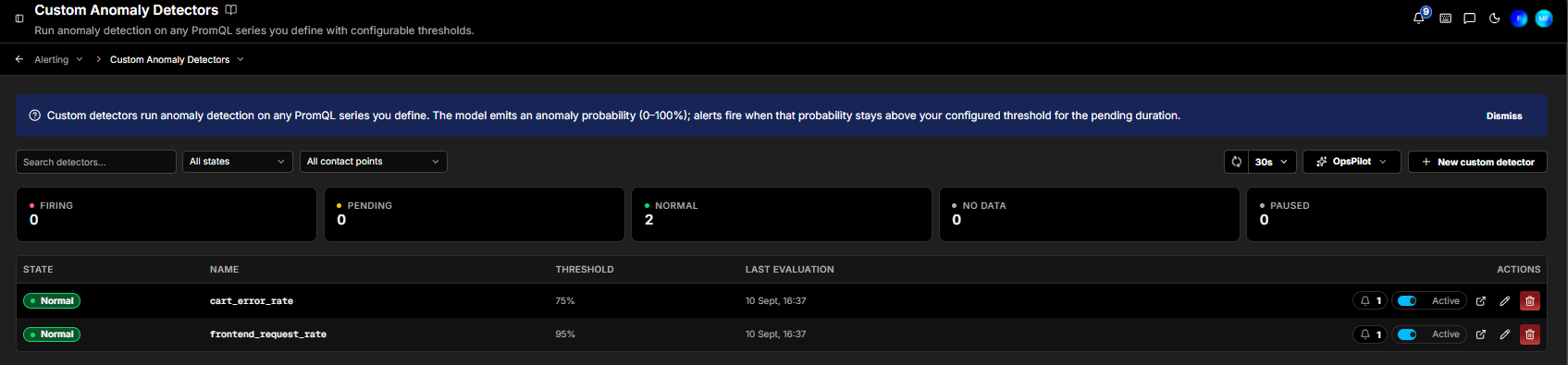
The detectors list
Your custom detectors are listed with the same state counters as service detectors - Firing, Pending, Normal, No Data, and Paused. Use Search detectors to find one, and the All states and All contact points dropdowns to filter. To the right sit a refresh button and the auto-refresh interval (such as, 30s). The OpsPilot dropdown offers AI shortcuts. Until you add one, the page shows "No custom detectors yet."
Each detector row shows its State, Name, Threshold, and Last evaluation, plus actions: a notification count, an Active toggle, Open dashboard, Tune detector (edit), and Delete.
Creating a custom detector
Click + New custom detector (top right of the page), or use the Wizard (New custom detector) on the Status or Rules page. Fill in the fields below, then click Create detector to save.
The guided wizard
Starting from the Wizard asks one question at a time instead of presenting the whole form. After choosing Anomaly Detector and then Custom Detector (see Creating a detector from the wizard), it asks which metric to watch, and then how sensitive detection should be.
How sensitive should detection be? offers three presets. Higher sensitivity catches more anomalies but may alert more often:
| Preset | Anomaly threshold | Description |
|---|---|---|
| Low | 95% | Fewer alerts, only strong anomalies |
| Medium | 90% | Balanced sensitivity |
| High | 80% | More alerts, catches subtle changes |
The percentage is the anomaly threshold described under When to fire - the score at or above which the detector fires. The relationship is inverted, so a lower sensitivity sets a higher threshold: at Low, the model has to be 95% confident before anything fires.
Whichever preset you pick, you can change the threshold afterwards on the detector itself, so this is a starting point rather than a commitment.
Who gets notified? is the last step. Pick one or more contact points with + Add contact point, or click Skip to create the detector without notifications and add them later. Click Done to finish.
As in the alert rule wizard, each step offers ← to go back, Skip to form to leave the wizard for the full form, Ask OpsPilot for a recommendation, and ✕ to close without creating anything. Skip to form is offered on every step but the last, where Skip and Done take its place.
Signal
Defines the PromQL series the detector watches. The query is validated against the Prometheus datasource on save.
| Field | Description |
|---|---|
| Query name | Required. Used as the query_label on ml_anomaly_probability{query_label="..."}. Letters, digits, _ or - only; must start with a letter or underscore |
| Aggregator | How the series is aggregated before scoring (default: avg) |
| PromQL expression | The metric series to watch. Build it in Builder mode (Watch [metric], with optional aggregate and filter), or switch to Code to write PromQL directly |
When to fire
The model emits a 0-100% anomaly score. The alert fires if the score stays at or above your threshold for the pending duration.
| Field | Description |
|---|---|
| Anomaly threshold (probability) | Slider from 50% to 100%. The alert fires when the score is at or above this value (such as, 95%) |
| Pending for | How long the score must stay above the threshold before the alert fires (such as, 5m) |
Then notify
Choose which contact points receive alerts from this detector. Click + Add to select a contact point.
Toggle investigate on fire to have Coworker automatically investigate when this detector fires.
Learn more
Service Anomaly Detectors - the detectors created automatically for each instrumented service